
Telerik UI for ASP.NET AJAX
What's New R3 2021
What's New HistoryArchived release. This page is no longer updated. Check the Latest Release
New Component: DateRangePicker
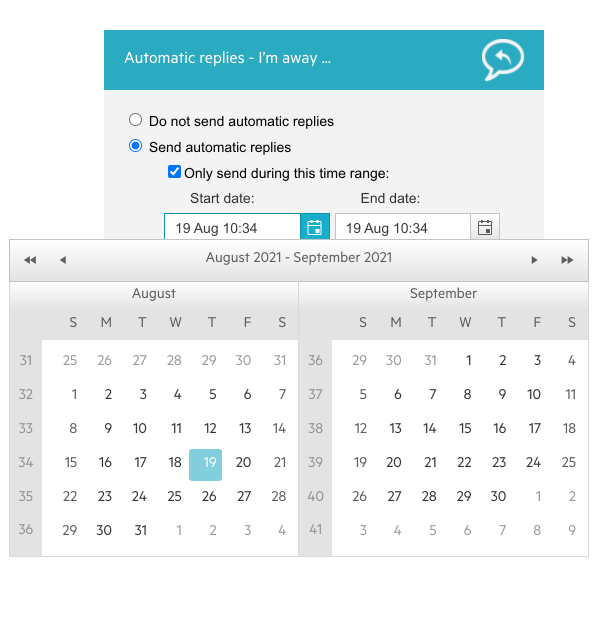
With this release, we are adding a DateRangePicker component to our suite. It combines two DatePicker components and allows users to select a date range either by clicking on the desired dates in the calendars or by utilizing their keyboard. The component is highly customizable and comes with built-in skins to meet any design requirements.
New DatePicker Accessibility Improvements
The DatePicker component has been optimized for the latest accessibility standards. JAWS will now announce the selected date in the Date Grid. Clicking Tab will refocus the DatePicker so that it doesn’t interfere with the user’s interaction with the component. Moreover, the Escape button used in keyboard navigation will now work in all browsers.

New Calendar Accessibility Improvements
New Enhancements: Telerik Document Processing
In R3 2021, we have added something new for those of you using Telerik Document Processing within their Telerik UI for ASP.NET AJAX projects! In the latest distribution package, you will find several of the most user-requested features, such as:
- PdfProcessing: Handle import of documents with invalid cross-reference table offsets.
- SpreadStreamProcessing & SpreadProcessing: Support for XLSM.
- WordsProcessing: Introduce a way to replace text with other document elements.
Upcoming Support for Web Live Preview
We are thrilled to announce that we’re working closely with Microsoft to release full support for Web Live Preview and provide compatibly with the Telerik UI for ASP.NET AJAX component suite in time for the WLP official release, scheduled for later this year. The WLP extension enables real-time mapping between the source code in Visual Studio and the web app, meaning that you no longer need to go back and forth between Visual Studio and the rendered HTML files to manually update them to see how the changes you made are reflected on the website.





Next Steps
See Telerik UI for ASP.NET AJAX in action and check out how much it can do out-of-the-box.
Check out the offers. Purchase an individual suite, or treat yourself to one of our bundles.
Try Telerik UI for ASP.NET AJAX with dedicated technical support.